

TL;DR:
- Securely archiving guest data involves encrypting, classifying, and retaining it only as long as legally required. It requires building a data flow architecture with strict retention rules, not just displaying a privacy notice.
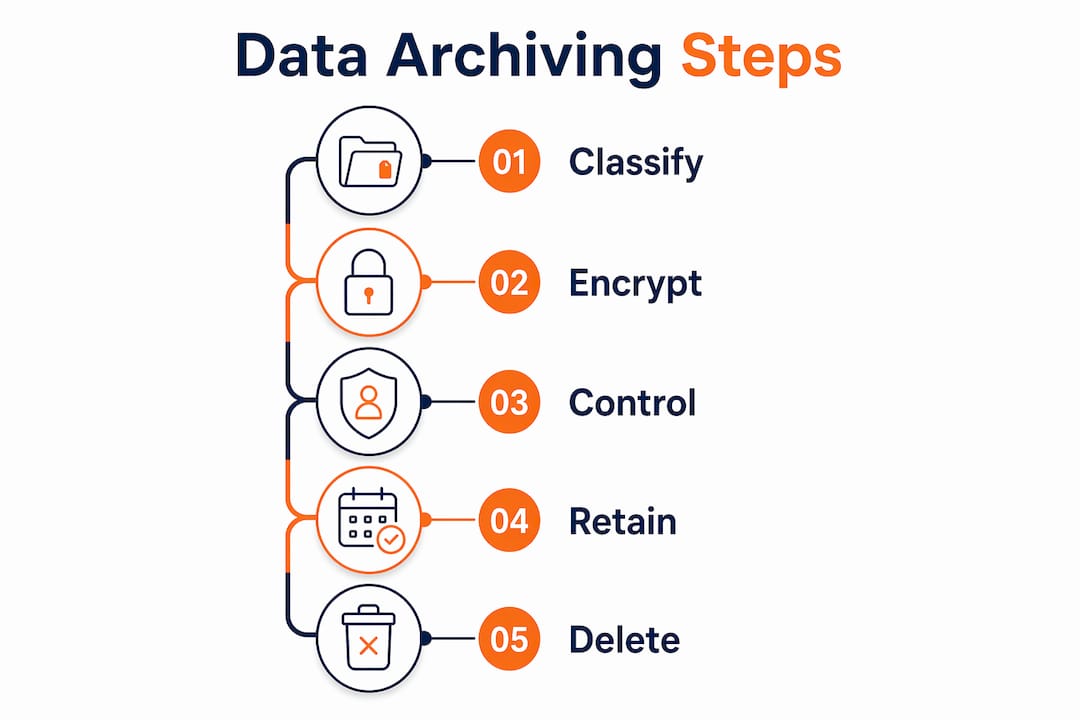
Securely archiving guest data is defined as the process of encrypting, classifying, and retaining personal information only for as long as the law requires, then deleting it in a documented, verifiable way. For property owners and managers across Europe, this is not optional. GDPR and its national equivalents impose strict obligations on how you collect, store, and erase guest records. Knowing how to archive guest data safely means building a data flow architecture with enforced retention rules, not simply ticking a privacy notice. Guestadmin supports this process by automating archiving workflows and keeping records GDPR-compliant across multiple properties.
What tools and technologies are essential for securely archiving guest data?
The technical foundation of secure guest data storage rests on three pillars: encryption, access control, and automated retention. Without all three working together, any one weakness creates a compliance gap.

Encryption at rest and in transit
Encrypting guest data at rest and in transit, combined with role-based access control, is the recognised best practice for reducing breach risk in hospitality settings. Encryption at rest protects stored records if a server or device is compromised. Encryption in transit protects data moving between your property management system (PMS), booking platforms, and third-party tools. Use TLS 1.2 or higher for data in transit and AES-256 for stored records.
Role-based access control
Off-the-shelf PMS platforms often lack granular access permissions, exposing more guest data to staff than necessary. Broad permissions increase risk because any compromised account can access the full dataset. Role-based access control (RBAC) limits each staff member to only the data their role requires. A housekeeping coordinator, for example, needs room assignment data but not payment card details or passport numbers.
Secure data gateways and API controls
Integrations that use over-privileged API keys increase breach risk significantly. Scoped, single-purpose API endpoints with audit logs reduce the attack surface across every connected tool. A custom secure data gateway can centralise guest data management, enforcing retention rules automatically before data reaches storage. This approach removes the compliance burden from individual staff decisions.
Key technical requirements for secure archiving include:
- AES-256 encryption for all stored guest records
- TLS 1.2 or higher for all data transfers between systems
- RBAC policies that restrict access by job function, not by convenience
- Scoped API keys with single-purpose permissions and full audit logging
- Automated deletion workflows triggered by checkout date plus your defined retention period
- Cloud backup rotation following the 3-2-1 backup rule: three copies, two media types, one offsite
Pro Tip: Set your automated deletion trigger to fire 180 days after checkout as a default, then adjust per data category based on your legal obligations. This covers most European regulatory requirements without storing data indefinitely.
How to map guest data flows for compliance and secure archiving
Compliance arises from mapping every system that touches guest data, not from publishing a privacy notice. A data flow audit gives you a complete picture of where personal information enters your systems, where it travels, and where it ends up.
A thorough data flow mapping process follows these steps:
- List every system that handles guest data. Include your PMS, CRM, booking platforms such as Airbnb or Booking.com, channel managers, payment processors, and any marketing or analytics tools.
- Trace the data path for each system. Document what data enters, what is stored, how long it is kept, and who can access it.
- Identify high-risk transfer points. Unencrypted channels, over-permissive API keys, and third-party tools without signed data processing agreements all represent compliance failures.
- Create a data flow diagram. A visual map makes it far easier to spot gaps, redundant storage, or systems holding data longer than permitted.
- Define scripted deletion paths. For each data category, document exactly which system deletes the record, when, and how that deletion is verified.
- Document all data processors. Every third-party vendor that handles guest data must have a signed Data Processing Agreement (DPA) in place.
A detailed data flow audit covering your PMS, CRM, marketing tools, and third-party apps prevents compliance failures and makes responding to subject access requests far more manageable.
The table below shows the most common data categories, their typical legal basis, and recommended retention periods under GDPR:
| Data category | Legal basis | Recommended retention period |
|---|---|---|
| Booking and reservation records | Contractual obligation | 3 years post-checkout |
| Payment and invoicing data | Legal obligation (tax law) | 7 years |
| Passport or ID copies | Legal obligation (local law) | As required by national law |
| Marketing preferences | Consent | Until consent is withdrawn |
| Incident or complaint records | Legitimate interest | 3 years or until resolved |
Pro Tip: Treat your data flow diagram as a living document. Review it every time you add a new integration, change a PMS, or onboard a new booking platform. Outdated maps are as dangerous as no map at all.
Step-by-step process to archive guest records securely and compliantly
A structured archiving process removes guesswork and creates a defensible compliance record. The steps below apply whether you manage one property or fifty.
- Separate legally mandated data from discretionary data. Passport copies held for police reporting are mandatory. Marketing preferences collected at check-in are discretionary. Each category requires a different retention period and deletion trigger.
- Define retention periods per data category. Use the table above as a starting point, then verify against the national law in each country where you operate. Spain, Italy, and Portugal each have specific guest registration requirements that affect how long ID data must be kept.
- Automate archiving and deletion workflows. Automated deletion workflows reduce risk from indefinite retention and remove the need for manual intervention. Set triggers based on checkout date plus the defined retention period for each category.
- Verify that deletions apply across all systems. A deletion in your PMS does not automatically delete the same record in your CRM, marketing platform, or backup files. Each system needs its own verified deletion path.
- Enforce backup rotation policies. Backups must follow a rotation and retention policy to prevent deleted guest records from being restored improperly. Overwritten backups and restore processes that re-apply deletions prevent records from reappearing after erasure.
- Respond to data subject requests within 30 days. Responding to access and deletion requests within 30 days is a mandatory GDPR requirement. A documented response process with identity verification steps protects you legally and operationally.
- Document every step. Failing to document data archiving processes is the primary cause of compliance failure in hospitality. Written policies, signed DPAs, and deletion logs are your evidence in the event of a regulatory audit.
Discipline in recording only legally required fields and deleting data promptly reduces both breach risk and compliance failures. Collect the minimum data needed, archive it securely, and delete it on schedule.
What are common challenges in guest data archiving and how do you fix them?
Even well-intentioned property managers run into recurring problems when archiving guest records. Knowing the pitfalls in advance saves significant time and legal exposure.
Multiple integrated systems create fragmented archives. When guest data lives in five or six platforms simultaneously, a deletion in one system rarely cascades to the others. The fix is a centralised data gateway that enforces deletion across all connected systems from a single trigger.
Automated policies drift without audits. A retention rule set up correctly in january can break silently when a platform updates its API or changes its data schema. Schedule a quarterly audit of all automated workflows to confirm they are still firing correctly.
Data subject requests expose process gaps. When a guest requests erasure, the response must cover every system holding their data. Without a complete data flow map, property managers often miss records in backup files, marketing tools, or third-party analytics platforms.
Common mistakes that create compliance risk:
- Storing guest ID copies indefinitely because no deletion trigger was set
- Using a single shared login for all staff, making audit logs useless
- Failing to obtain signed DPAs from every third-party vendor
- Assuming a privacy notice alone satisfies GDPR obligations
- Neglecting to train staff on what data they are permitted to access and why
“Compliance is not just a privacy notice. It is a full data flow architecture with enforced retention and deletion rules operating at the platform layer.” — SendSquared, Hotel Guest Data: GDPR, CCPA & PMS Data Flow Compliance
Staff training is a frequently overlooked control. A well-configured system can still be undermined by a staff member who exports a guest list to a personal spreadsheet or shares login credentials. Regular, documented training sessions close this gap and demonstrate due diligence to regulators.
For a practical overview of your EU compliance obligations, a structured checklist helps confirm that every system and process meets the required standard.
Key takeaways
Securely archiving guest data requires encryption, documented data flow mapping, and automated retention policies enforced across every system that holds personal information.
| Point | Details |
|---|---|
| Encrypt everything | Apply AES-256 at rest and TLS 1.2 in transit across all systems holding guest records. |
| Map every data flow | Audit all platforms, document retention periods, and sign DPAs with every third-party processor. |
| Automate deletion triggers | Set scheduled deletion workflows per data category to avoid indefinite storage and manual errors. |
| Verify backups separately | Ensure backup rotation policies prevent deleted records from being restored after erasure. |
| Document all processes | Written policies and deletion logs are your primary defence in a regulatory audit. |
Why I think most property managers are solving this problem backwards
Most of the property managers I speak with focus first on choosing a platform and then try to retrofit compliance into it. That approach almost always fails. The platform becomes the constraint, and the compliance work becomes a workaround rather than a foundation.
The more reliable approach is to map your data flows first, before you touch any tool configuration. Once you know exactly where guest data enters, travels, and needs to be deleted, the technical choices become straightforward. You are selecting tools to execute a defined architecture, not hoping a tool will create one for you.
The practical downside of getting this wrong is not abstract. A single data breach involving unencrypted passport copies can result in regulatory fines, reputational damage, and the operational chaos of responding to dozens of data subject requests simultaneously. I have seen property managers spend weeks untangling a compliance failure that a two-hour data flow audit would have prevented entirely.
The other thing worth saying plainly: staff training is not a one-off task. The best technical controls in the world do not prevent a well-meaning employee from exporting a guest list to a personal device. Regular, documented training sessions are as much a compliance control as encryption is.
If you manage properties across multiple European countries, the complexity multiplies. Spain, Italy, Portugal, and Greece each have national guest registration laws that interact with GDPR in specific ways. A centralised, automated system is not a luxury at that scale. It is the only practical way to maintain consistent compliance without a dedicated legal team.
— Alex
How Guestadmin makes secure guest data archiving manageable
Property managers handling compliance across multiple European markets need a system that does the heavy lifting automatically.
Guestadmin automates guest data archiving workflows, applies built-in encryption, and enforces role-based access across every property in your portfolio. The platform’s compliance dashboards give you a clear audit trail, and its AI-powered processing submits guest data to the relevant authorities within 24 hours of check-in. For managers who need to stay compliant across short-term rentals without building a manual compliance programme from scratch, Guestadmin handles the architecture so you can focus on running your properties. See how it compares to other platforms in the 2026 property management software comparison.
FAQ
What does GDPR require for guest data retention?
GDPR requires that personal data is kept no longer than necessary for its original purpose. Retention periods vary by data category: booking records typically require 3 years, while financial data requires up to 7 years under tax law.
How do I safely delete guest data from backups?
Backups must follow a rotation and retention policy that overwrites or re-applies deletions during restore processes. This prevents deleted guest records from reappearing when a backup is restored.
What is the 3-2-1 backup rule for guest data?
The 3-2-1 rule means keeping three copies of data, on two different media types, with one copy stored offsite. This protects against data loss while supporting controlled deletion across all copies.
How quickly must I respond to a guest’s erasure request?
GDPR mandates a response to data subject access and deletion requests within 30 days. The response must cover every system holding the guest’s data, including backups and third-party platforms.
Do I need a Data Processing Agreement with every third-party tool?
Yes. Every third-party vendor that processes guest personal data on your behalf must have a signed Data Processing Agreement in place. This is a GDPR requirement, not a recommendation.
One Comment
PMS Guest Registration Integration That Saves Time - Guest Registration Services
[…] names, but it cannot reliably manage booking changes, scheduled reporting, submission receipts and retention requirements across multiple […]