

TL;DR:
- Proper guest data archiving is essential to avoid regulatory fines, reputational harm, and operational inefficiencies. It requires understanding relevant legal frameworks, mapping data categories, implementing automated deletion, and maintaining thorough audit logs to ensure compliance across jurisdictions. Regular reviews, staff training, and transparent privacy notices help manage risks and build guest trust effectively.
Getting guest information archiving steps wrong does not just create administrative headaches. It can expose your hospitality business to regulatory fines, reputational damage, and operational inefficiencies that are entirely avoidable. Across Europe, property owners and managers face a patchwork of legal frameworks including GDPR, Italy’s Alloggiati Web, Spain’s SES.HOSPEDAJES, and Turkey’s KVKK, each with distinct retention requirements and deletion obligations. This guide gives you the precise steps, legal grounding, and practical tools to archive guest data correctly, compliantly, and with confidence.
Table of Contents
- Key takeaways
- Before you start: legal frameworks and data categories
- The guest information archiving steps in practice
- Common mistakes in guest data archiving
- How to verify and audit your archiving
- My perspective on where most operators get this wrong
- How Guestadmin makes this process manageable
- FAQ
Key takeaways
| Point | Details |
|---|---|
| Know your retention periods | Financial records require 6 to 10 years; guest PII typically 30 days post-stay; CCTV footage 30 to 90 days. |
| Document everything | Retention schedules must include data type, purpose, retention period, and disposal method to satisfy GDPR. |
| Automate deletion | Rely on automated, cryptographically verified deletion rather than manual processes to reduce error and enforcement risk. |
| Audit regularly | Set a quarterly audit schedule to verify deletion logs, test anonymisation, and review your retention policy. |
| Transparency reduces burden | Publishing clear retention periods in your privacy notice lowers the volume of subject access requests you receive. |
Before you start: legal frameworks and data categories
Compliant guest information archiving does not begin with filing or storage. It begins with understanding what you hold, why you hold it, and how long the law permits you to keep it. Skipping this preparation is the single most common reason property managers face compliance failures later.
The legal frameworks that apply to you
Most property owners operating in Europe will be subject to GDPR as their primary obligation, but local legislation adds layers on top. KVKK requires explicit consent for certain data processing activities in Turkey and mandates strict retention and destruction policies, with guest identity data and financial data both requiring up to 10 years’ retention under Turkish law. Post-Brexit operators in the UK must also consider UK GDPR alongside any EU data transfer obligations, which now require specific mechanisms such as UK IDTAs or EU adequacy decisions rather than free data flows.
Cross-border data transfers need particular attention. If your property management software processes data on servers outside the UK or EU, the transfer mechanism must be documented. The EU-US Data Privacy Framework applies in some cases, but you must verify your vendor’s certification status before assuming coverage.
Data categories and their retention periods
Not all guest data carries the same legal weight or the same retention requirement. The table below maps the main data types you are likely to hold against their typical retention periods.
| Data category | Typical retention period | Legal basis |
|---|---|---|
| Guest PII (name, passport, address) | 30 days post-stay | GDPR Art. 6(1)© legal obligation |
| Financial and booking records | 6 to 10 years | Tax and accounting law |
| CCTV footage | 30 to 90 days | Legitimate interest |
| Wi-Fi access logs | Up to 2 years | National law (varies) |
| Allergy and dietary information | Delete at end of stay | Data minimisation principle |
| AI system interaction logs | Defined period with automated purge | ICO guidance |
These retention requirements vary by jurisdiction, so a blanket policy applied across all data types will almost certainly leave you non-compliant somewhere. For B&Bs, for instance, booking records require 2 years of retention while allergy or dietary data must be deleted at the end of the stay itself.
Your data inventory
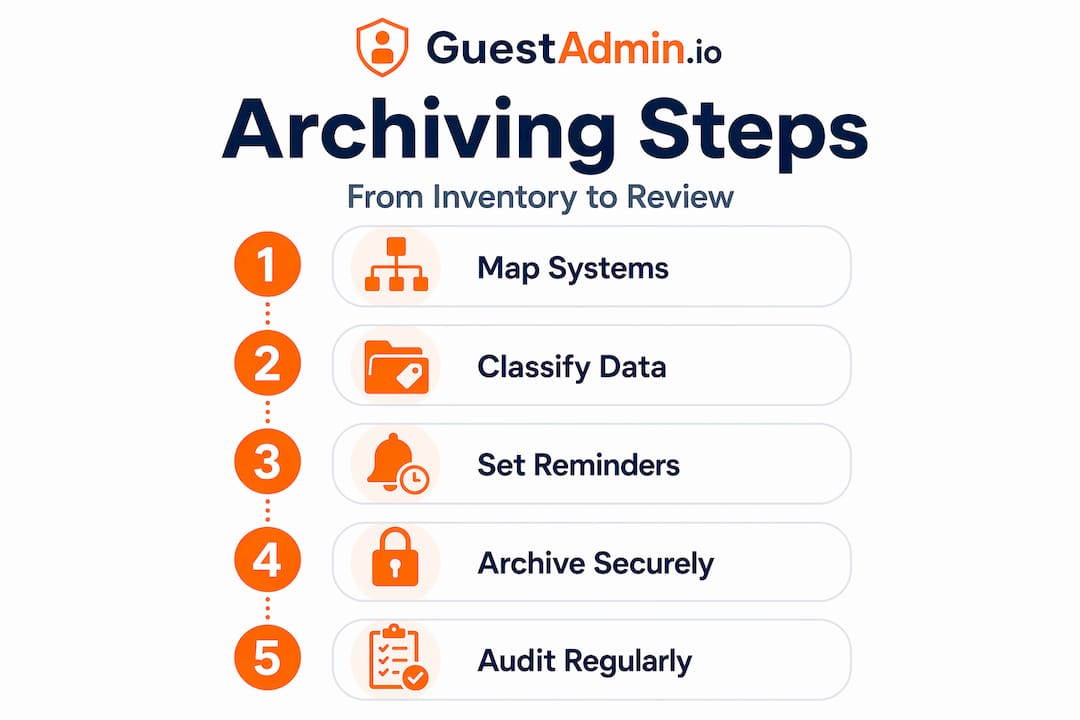
Before archiving anything, map every system that touches guest data. Your PMS, your OTA connections, your check-in app, your Wi-Fi provider, your CRM, and any loyalty programme you operate. Each one is a data source that must be included in a formal data inventory. This inventory forms the backbone of your retention policy and your ability to respond to subject access requests efficiently. Pair it with documented data privacy best practices specific to hospitality so nothing falls through the gaps.

The guest information archiving steps in practice
With your data categories mapped and your legal obligations understood, you can move through the archiving process methodically. The following steps cover the full archiving guest data process from assessment through to ongoing management.
-
Assess and map your existing data. Go system by system. List every location where guest data is stored, including cloud backups, email archives, and third-party integrations. Note the data type, the volume, and the format. This step frequently reveals data you did not know you were holding, such as years of unanonymised guest preferences in a legacy CRM.
-
Define retention schedules by data category. Using the categories identified in your inventory, produce a written retention schedule. Retention schedules must document the data type, its purpose, the retention period, and the method of disposal. Do not rely on a single blanket period for all records.
-
Implement automated deletion and anonymisation. Manual deletion is unreliable and unverifiable. Automated systems should trigger deletion or anonymisation at the end of each retention period. Secure deletion requires cryptographic erasure and automatic log rotation; anonymisation is only lawful where re-identification is genuinely impossible. Set up your PMS or data management platform to enforce these triggers without requiring human action for each record.
-
Establish access controls and an erasure request procedure. Define clearly who within your business can access archived guest data and under what circumstances. Create a documented procedure for handling erasure requests. Erasure requests must be answered within one month unless legal obligations require you to retain the data for longer, in which case the exception must be documented.
-
Train your staff. Your archiving procedures are only as strong as the people following them. All staff who handle guest data, from reception to finance, need to understand what data they hold, how long to keep it, and what to do when a guest submits a data request. Training records should be kept as evidence during audits.
-
Maintain audit logs. Every deletion, every access, every amendment to archived records should be logged. These logs are your primary evidence of compliance during a regulatory inspection. Store them securely and make them readily accessible to your compliance lead.
Pro Tip: Set calendar reminders tied to each data category’s retention period expiry rather than relying solely on system automation. This creates a human checkpoint that catches configuration errors before they become regulatory problems.
For more on reducing manual errors across the archiving guest data process, the guide on avoiding manual data submission mistakes offers directly applicable advice.
Common mistakes in guest data archiving
Even property managers with good intentions make predictable errors in their guest record management steps. Knowing these pitfalls in advance gives you a significant advantage.
-
Over-retaining guest PII. Keeping names, passport numbers, and addresses beyond 30 days post-stay because “it might be useful” is a GDPR violation. Failing to delete data on schedule is one of the most common failures identified in hospitality enforcement cases. Purpose must justify retention; convenience does not.
-
Treating all data as one category. A single retention period applied across financial records, guest names, and CCTV footage will result in either premature deletion of legally required records or over-retention of data that should be gone. Category-based retention is not optional under GDPR’s storage limitation principle.
-
Manual deletion without verification. Telling a team member to “delete last year’s guest records” and assuming it is done is not a compliant process. Without a deletion log showing what was deleted, when, and how, you have no evidence to present if challenged.
-
Ignoring AI interaction logs. If you use AI-powered chatbots, recommendation tools, or digital concierge services, those systems generate data logs that contain guest information. AI system interaction logs require defined retention periods and automated purging. Many operators simply overlook these entirely.
-
No documented policy at all. Intention without documentation counts for very little in a regulatory investigation. Your retention policy must exist in writing, must be reviewed regularly, and must be applied consistently across all properties and systems.
Cross-border vendor compliance is an area that catches many multi-property managers off guard. If your PMS or CRM provider processes data outside the UK or EU, you are legally responsible for ensuring the transfer mechanism is valid. Verify your vendor’s data processing agreement before assuming they handle this for you.
For a thorough grounding in your legal obligations, the GDPR compliance guide for short-term rental managers provides jurisdiction-specific detail.
How to verify and audit your archiving
Implementing your archiving procedures is step one. Verifying that they actually work is what keeps you compliant over time. Many hospitality businesses set up a system once and never check whether it is still functioning correctly.
-
Schedule quarterly internal audits. Review your deletion logs, confirm that automated processes ran correctly, and spot-check a sample of archived records against your retention schedule. Quarterly is the minimum; high-volume properties should consider monthly checks.
-
Use a compliance checklist. Your checklist should cover every data category, the expected deletion date, the deletion method used, and who verified it. This becomes your primary audit document and your first line of defence during regulatory inspections.
-
Test your automated deletion functions. At least once per year, run a controlled test of your automated deletion system using synthetic or anonymised data. Confirm that records are deleted fully, that no residual data remains in backup systems, and that the deletion is logged correctly.
-
Prepare for external audits and regulatory inspections. Regulators in several European jurisdictions conduct proactive inspections of hospitality businesses. Have your retention policy, deletion logs, staff training records, and data inventory ready to present at short notice.
-
Track and respond to subject access requests. Transparency in privacy notices reduces the volume of subject access requests you receive, but you will still receive them. Log every request, document your response, and record the outcome. Patterns in requests often reveal gaps in your privacy communications that you can address proactively.
Pro Tip: Include a review of your privacy notice in your annual audit cycle. If your retention periods or data categories have changed, your privacy notice must reflect that. An outdated notice is itself a compliance risk.
Your data security practices should also be reviewed during these audit cycles, since archiving and security controls are interdependent.
My perspective on where most operators get this wrong
I have seen property managers invest real effort in setting up archiving procedures, only to leave the verification side almost entirely unattended. The system is configured, a policy document is written, and then nothing is tested for 18 months. By that point, a software update has broken the automated deletion trigger, or a new OTA integration is feeding guest data into a system that is not covered by the retention schedule at all.
The honest reality is that archiving is not a set-and-forget process. Regulations change. Systems change. Your property portfolio changes. What worked compliantly in 2023 may have a gap by 2026 simply because you added a new booking channel or switched your PMS provider.
What I have found genuinely effective is treating compliance audits the same way you treat fire safety checks. They go in the calendar, they happen regardless of how busy the season is, and someone is personally accountable for signing off the results. The businesses I have seen avoid enforcement action are invariably the ones with that rhythm built in, not the ones with the most sophisticated technology.
Transparency with guests also matters more than most operators realise. Publishing clear, specific retention periods in your privacy notice does two things. It reduces the number of subject access requests you have to manage, and it builds the kind of trust that converts first-time visitors into returning guests. Both outcomes have a direct operational value.
The regulatory direction of travel is clearly towards stricter enforcement and broader scope, particularly as AI tools become embedded in hospitality operations. Getting your information retention strategy for guests right now, before an inspection, is significantly less costly than addressing it under pressure afterwards.
— Alex
How Guestadmin makes this process manageable
Implementing all of the guest information archiving steps described in this guide manually across multiple properties is a significant undertaking. Guestadmin is built specifically to remove that burden. The platform automates retention schedules and deletion triggers across your PMS and OTA integrations, generates audit-ready compliance reports, and maintains a full record of every data submission and deletion event. You get the documentation regulators expect without building it from scratch yourself.
If you manage properties across more than one jurisdiction, Guestadmin’s multi-property dashboard gives you a single view of compliance status across all locations. For a structured approach to putting this into practice, the step-by-step guide to automating hospitality compliance walks you through exactly how the platform handles each stage. You can also explore how automation protects your rental business from the enforcement risks covered throughout this guide.
FAQ
How long should hotels keep guest personal data?
Guest PII should be retained for 30 days post-stay under GDPR, while financial and booking records require 6 to 10 years depending on jurisdiction. Data categories must be treated separately with individual retention periods.
What does a compliant retention schedule include?
A compliant retention schedule must document the data type, its processing purpose, the retention period, and the method of disposal. Retention policies must be documented and regularly reviewed to satisfy GDPR’s storage limitation principle.
Can I delete guest data manually rather than using automated systems?
Manual deletion is permissible but carries significant risk. Without verified deletion logs and cryptographic confirmation of erasure, you cannot demonstrate compliance if audited. Automated deletion with logged evidence is strongly recommended to reduce enforcement exposure.
How quickly must I respond to a guest erasure request?
Erasure requests must be complied with within one month of receipt. Exceptions apply only where a legal obligation requires you to retain the data, and that exception must be documented and communicated to the guest.
Do AI chatbot logs count as guest data under GDPR?
Yes. Any log that records a guest’s interactions with an AI system and can be linked to an identifiable individual is personal data under GDPR. These logs require defined retention periods and must be subject to automated purging in the same way as other guest records.